About 365-day savings plan-Easy Goal
The 365-Day Savings Plan APP is a simple and easy-to-use savings management app that combines daily savings records and periodic savings plans. It features intuitive progress visualization, flexible time filtering,...
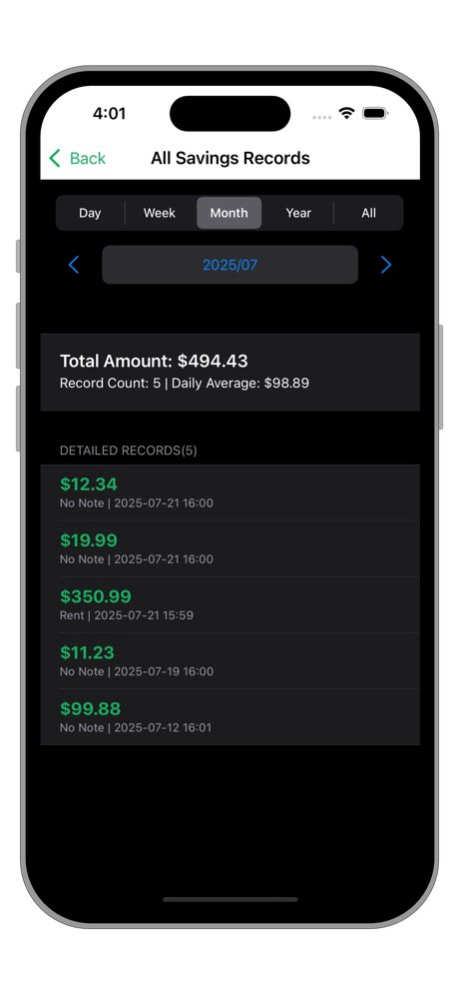
The 365-Day Savings Plan APP is a simple and easy-to-use savings management app that combines daily savings records and periodic savings plans. It features intuitive progress visualization, flexible time filtering, multi-currency support, and iCloud sync functionality, while prioritizing user experience and operational security. Easy to Use: Example: I want to buy an SUV, priced around 50,000. 1. First, use the 365-Day Savings Plan to create a periodic (monthly) savings plan for buying a car (Plan A), setting the target amount and the amount to deposit each time. 2. When you have disposable assets each month, select Plan A and execute it immediately to add a new deposit. 3. The progress will gradually approach 100%, and you can track the current progress, next execution date, number of executions, remaining amount, etc. 4. Once completed, it will automatically be categorized under "Completed." Simple and convenient! You only need to focus on the progress of your savings goal and the remaining amount. You can have as many different savings goals as you need-unlimited new goals to strive for! Main Features: Intuitive Progress Display The top of the main interface shows the total savings amount, completed days (e.g., "100/365 days"), and progress percentage. Click the "Today" button to quickly scroll to today's date. The progress bar updates dynamically, with colors indicating completion status. Custom currency symbols. Daily Record Management: Supports adding, deleting, editing, and viewing records. Displays the total amount, number of records, and average daily savings. Click on a specific day to view detailed records, with support for adding, editing, or deleting individual entries. Records are sorted in descending chronological order, showing the amount, notes, and creation time. Daily Savings Records: Record savings amounts by day, with support for adding notes and dates. Grid view provides an intuitive display of 365-day savings progress, with saved dates highlighted. Filter records by year or month, and quickly jump to the current day or a specified month. Automatic Savings Plans: Create periodic savings plans (daily/weekly/monthly), setting the target amount and the amount to deposit each time. Plans support activation, pausing, immediate execution, editing, and deletion. Plan progress is displayed via percentage and the next execution date. List of automatic savings plans, with filtering options (All/Active/Completed). Data & Export: Supports exporting savings records and automatic plans as formatted PDF documents, making it easy to print and archive. Generates PDF reports, automatically creating PDF files that contain statistical information, tabular data, and summary analysis, which are more visually appealing and readable than CSV format. iCloud data backup and synchronization, with automatic mode available. Provides a summary view of all records, with filtering options by day, week, month, year, or all records. Supports selecting a date range to export data in CSV format. Customizable currency symbols, with all amounts displayed accordingly. Compatible with both dark mode and light mode.
Version History Export data in PDF format; include title, date range, statistical information, table data, etc. Add more localized languages. 3.4 Feb 3 Bugfixs 3.3 Jan 11 Now you can add custom currency symbols. 3.2 08/07/2025 Optimize functionality Fix bugs 3.1 07/30/2025 New development and design. The new version combines: daily savings record, automatic savings plan. 3.0 07/22/2025 Bugfix Remove the purchase 1.3 03/25/2017 New date selection Support Touch ID Compatible with iPhone 6 Plus Compatible with iPhone 7 Plus 1.2 01/07/2017 Optimize iCloud synchronization & speed Fix some of the user feedback 1.1 11/07/2016 1.0 10/25/2016
Previous Versions
Here you can find the changelog of 365-day savings plan-Easy Goal since it was posted on our website on 2016-12-23 21:11:48.
The latest version is 3.4 and it was updated on 2026-10-14 07:28:50. See below the changes in each version.
365-day savings plan-Easy Goal version 3.4
Updated At: 2026-10-14
Changes: Version History Export data in PDF format; include title, date range, statistical information, table data, etc.
Add more localized languages. 3.4 Feb 3 Bugfixs 3.3 Jan 11 Now you can add custom currency symbols. 3.2 08/07/2025 Optimize functionality
Fix bugs 3.1 07/30/2025 New development and design.
The new version combines: daily savings record, automatic savings plan. 3.0 07/22/2025 Bugfix
Remove the purchase 1.3 03/25/2017 New date selection
Support Touch ID
Compatible with iPhone 6 Plus
Compatible with iPhone 7 Plus 1.2 01/07/2017 Optimize iCloud synchronization & speed
Fix some of the user feedback 1.1 11/07/2016 1.0 10/25/2016
365-day savings plan-Easy Goal version 3.4
Updated At: 2026-02-03
Changes: Export data in PDF format; include title, date range, statistical information, table data, etc.
Add more localized languages.
365-day savings plan-Easy Goal version 3.2
Updated At: 2025-08-07
Changes: Aug 7, 2025
Version 3.2
Now you can add custom currency symbols.
365-day savings plan-Easy Goal version 1.1
Updated At: 2016-10-26
Disclaimer
Official App Store Link
We do not host 365-day savings plan-Easy Goal on our servers. We did not scan it for viruses, adware, spyware or other type of malware. This app is hosted by Apple and passed their terms and conditions to be listed there. We recommend caution when installing it.
The App Store link for 365-day savings plan-Easy Goal is provided to you by apps112.com without any warranties, representations or guarantees of any kind, so access it at your own risk.
If you have questions regarding this particular app contact the publisher directly. For questions about the functionalities of apps112.com contact us.